Reinforcement learning in Python to teach an RC car to drive itself — Part 3
Simulating the real world
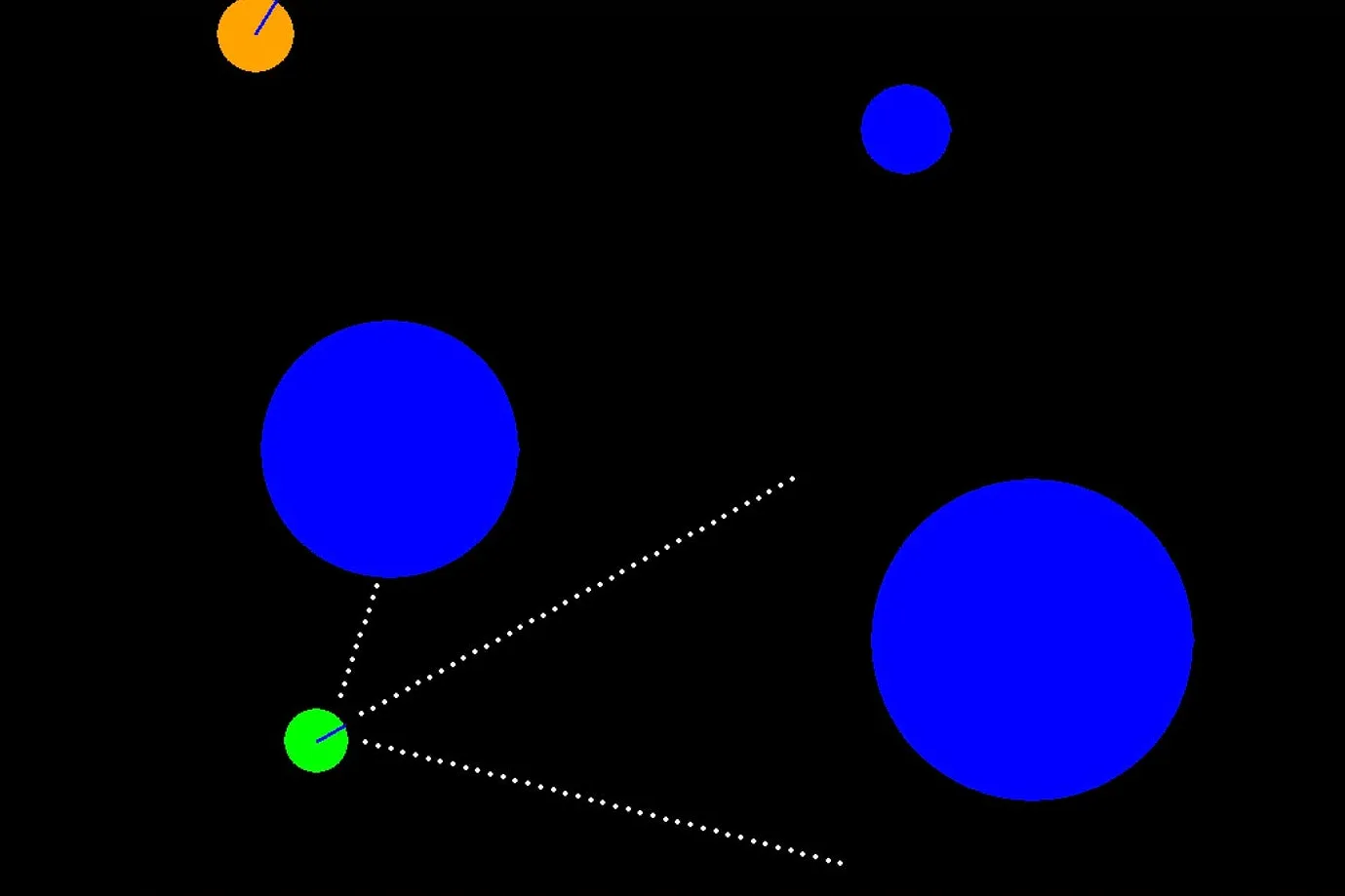
Part 3 in my reinforcement learning series is a bit of a setup post. In part 1, we discussed the fundamentals of reinforcement learning in Python. In part 2, we discussed how to measure the neural network’s performance, did some hyper parameter tuning, discussed patterns that emerged from the tuning, and outlined next steps.
This post is the implementation of those next steps, which gets us very close to turning this into a real-world autonomous vehicle.
Just want the code? It’s on GitHub here. Pull requests welcomed!
My goal with this project is to create a self-learning, self-driving RC car that can navigate my apartment without bumping into things.
Part 2’s “Next Steps” revisited:
- We can’t get “pixel readings” at a matrix of points in front of and beside the car. Instead, we’ll have to use ultrasonic sensors. So change the input to be the a reading of three distances from the car to any object it detects. With this, we also have to update our reward function.
- In real life, we can’t reset the car to its starting point when it crashes, so we need a recovery algorithm.
- We can’t set a collision flag to true when we bump into something, so we need to use the sensor readings to detect a crash in order to initiate the recovery algorithm.
- Cats aren’t stationary: We’re going to need some dynamic obstacles.
Let’s address these one at a time.
#1: Simulating sonar
It turns out that changing our sensors from a matrix of pixel readings to three distance readings isn’t that difficult, it just requires a rethinking of the implementation. We accomplish it by doing the following:
- Create three arms (or lines) of pixel dots along the horizontal axis. Each of these arms mimics one sonar sensor.
- Rotate each line about the car to create a fan-like array of the sensor arms, 45 degrees to the left, center, and 45 degrees to the right of the direction the car is moving.
- At each step—each time we need a reading—loop through each arm starting at the point closest to the car and iterating from the first to the last point in the arm until we hit a point that has a reading that’s non-black (or we get to the end). Then we simply return the iteration we’re on. For instance, if the fifth dot on the first arm reads a blue pixel, then we know the “distance” of that sensors is 5 because we loop from 1 to 5, 5 returns non-black, and we return the iteration count. We’ll pretend this means 5 cms.
- We return an array of the three sensor readings, effectively giving our neural network a rough picture of obstacles in front of it that we can reproduce in real life.
The python code to perform this is as follows:
# Step 1 (make an arm)

def make_sonar_arm(self, x, y):
    spread = 10 # Default spread.
    distance = 20 # Gap before first sensor.
    arm_points = []

    # Make an arm. We build it flat because we’ll rotate it about
    # the center later.
    for i in range(1, 40):
        arm_points.append((distance + x + (spread * i), y))

    return arm_points

# Steps 2 and 3 (rotate points, get readings, return distance):

def get_arm_distance(self, arm, x, y, angle, offset):
    # Used to count the distance (iteration=distance).
    i = 1

    # Look at each point and see if we’ve hit something.
    for point in arm:

        # Move the point to the right spot.
        # We move one point at a time to save time if we
        # run into something. No sense rotating the whole arm.
        rotated_p = self.get_rotated_point(
            x, y, point[0], point[1], angle + offset
        )

        # Check if we’ve hit something. Return the current i
        # if we did.
        if rotated_p[0] <= 0 or rotated_p[1] <= 0 \
                or rotated_p[0] >= width or rotated_p[1] >= height:
            return i # Sensor is off the screen.
        else:
            obs = screen.get_at(rotated_p)
            if self.get_track_or_not(obs) != 0:
                return i

    # If we made it here, we didn't run into anything.
    return i

# Step 4 is self-explanatory: just call these methods multiple times.
#2: Recovery algorithm
In the first versions of the simulation the car reset its position at the start as soon as it car hit something. Makes it easy to run tests, but isn’t practical in the real world (yet).
Turns out there’s an easy solution for this, too. If we’re in a crashed state (#3, below), just make the car back up a bit, at an angle. The key is to check for a collision again after the car reverses to see if we’re still in a crashed state. Guess that’s why they invented the while loop.
#3: Use sensor readings to detect crash
I originally used the collision callback provided by Pymunk to trigger the “is crashed” conditional. In order convert this into a real-world model, we will consider the car crashed if one of the sensor readings is really small. Thinking in real-world terms, if one of the sonar sensors reads 1 cm, we’re about to run into a wall, so we need to trigger the recovery algorithm. Piece of cake.
#4: Cats against overfitting
Adding dynamic objects started as a bit of a joke, since my cats are more likely to sit and stalk the car from afar than they are to run around the apartment. However, it ended up serving a very useful function: combatting overfitting.
Something that wasn’t immediately obvious after training my neural net in the first versions was that the car had sometimes learned how to drive a set circle around an object (or in free space), never crashing. This was a legitimate learned solution, until any unexpected object was introduced, causing Robocar to crash repeatedly.
So I added a relatively fast-moving “cat” and at the same time made the main obstacles move very slowly over time in random directions. This ensures our Robocar has to continuously adapt to its environment. Over-fitting solved. Thanks, cat!
Here’s a video of it doing its sonar thing:
Charting the loss
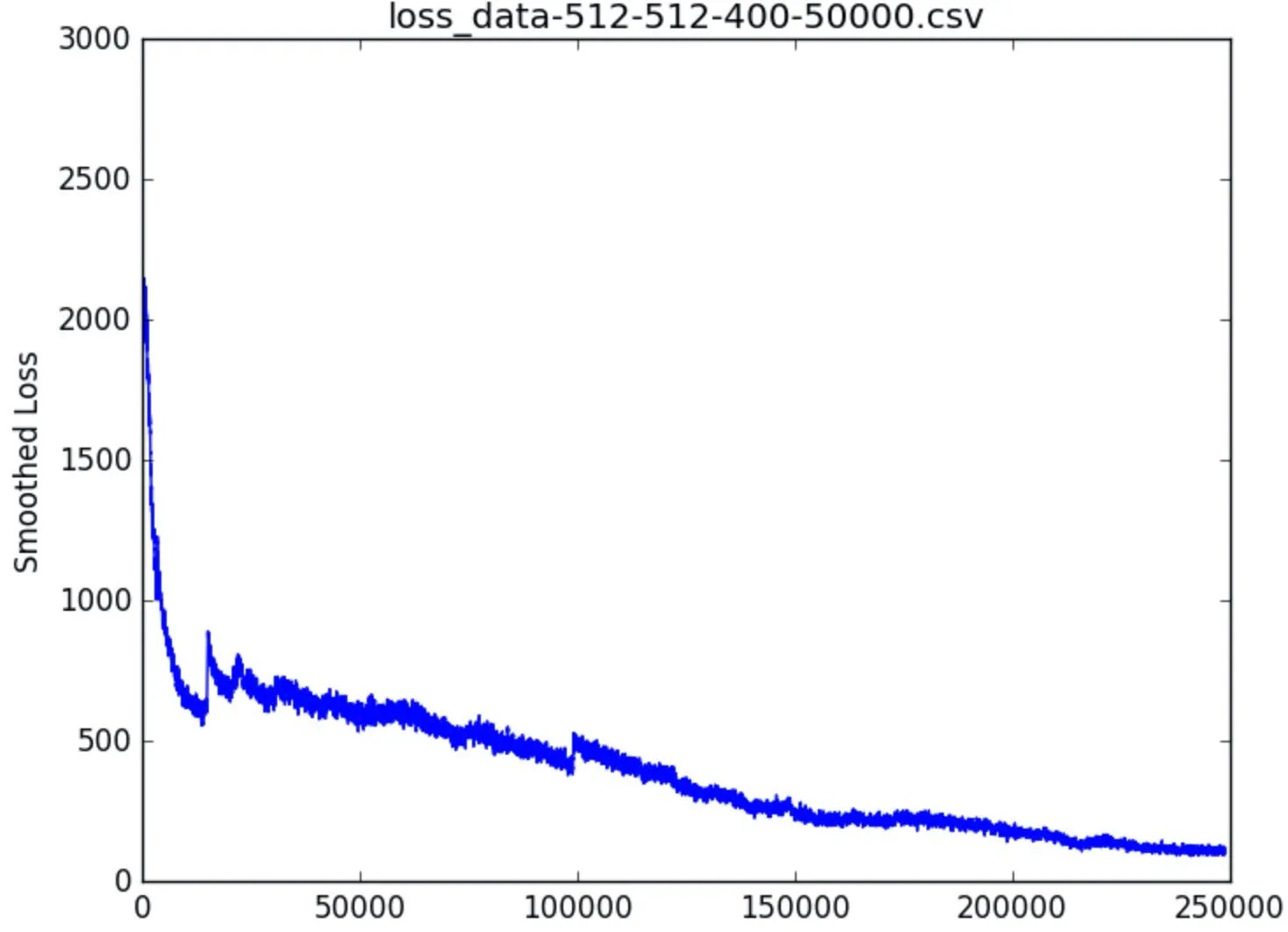
Smoothed loss graph for a 512x512 network. See the bump at 100,000? This is what happens when the Robocar gets stuck in a corner surrounded by a wall, the cat and an obstacle. It panics and loses some of its learning. Happens randomly in all the parameter permutations.
I did some hyper parameter tuning on the new simulation and observed some really nice results. I feel confident that this simulation is mostly reflective of the real world, so I should be able to train the net on the sim and then transfer that net to the real life model and have the car drive around the apartment.
At least that’s the plan.
The code is available on GitHub if you want to play around. Pull requests welcomed!
In part 4, we’ll take a break from reinforcement learning and try to figure out how to hook up three ultrasonic sensors, two raspberry pis, an RC car and our learned neural network to drive itself. Here’s a preview:
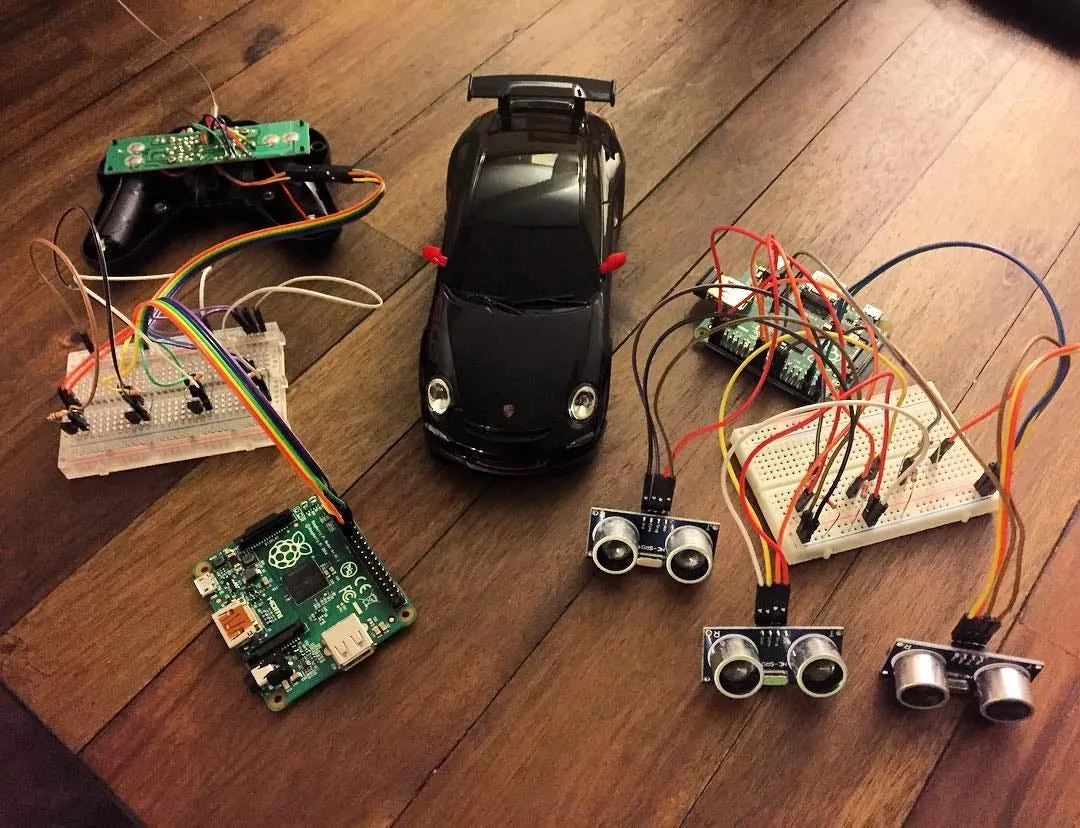
Raspberry Pi #1 connected to the remote, left. Raspberry Pi #2 connected to the ultrasonic sensors, right. Porsche 911 GT3, ready to race, middle. Stay tuned for part 4!